An LLM gateway from scratch, in ~150 lines
What an LLM gateway actually does — a minimal, keyless FastAPI program between apps and model providers that adds five security controls one at a time, each answering a question a CSV/QA reviewer is already asking.
Feel free to clone the repo and run it locally — one FastAPI file, a mock provider, no API keys required.
An “LLM gateway” sounds like infrastructure magic. It isn’t. It’s a thin program in front of model providers that adds five controls — and each control answers a question a regulated buyer (CISO, AI-platform lead, CSV/QA reviewer) is already asking. This artifact builds one in ~150 lines of one readable file, one control at a time.
The arc: Step 0 is what most teams accidentally ship. Steps 1–5 are what a gateway is for.
What you’re looking at
An LLM gateway is not magic infrastructure. It is a small program that sits between your apps and the model providers. To its clients it behaves like an HTTP server; to the provider it behaves like an HTTP client. That dual role is what people mean by “reverse proxy” — traffic comes in from apps, and the gateway turns around and makes a second request upstream.
Without a gateway, every app talks to the provider directly and holds the real API key:
flowchart LR
  A[Application] -->|provider API key| P[Model provider]
With a gateway, apps hold only a virtual key. The gateway is the only place that can resolve that key and attach real provider credentials:
flowchart LR
  C["Client<br/>(virtual key)"] --> G["Gateway<br/>(controls + provider credentials)"]
  G --> P[Model provider]
Think of the gateway as a guarded reception desk. Every request is asked the same questions, in order, before anything expensive happens:
- Who are you? — authenticate the virtual key
- Are you allowed this model? — allow-list / least privilege
- Do you still have spend authority? — budget check
- Which provider handles this model? — routing
- Send the approved request — call upstream
- Record what happened — audit log
The rest of this post builds those answers one control at a time (Steps 0–5). The teaching order is how the code was grown; the runtime order above is how a live request actually walks the desk.
Why this matters to you
Teams reach for a heavyweight enterprise gateway product before they can say what a gateway is for. That makes the controls un-auditable — you can’t validate a black box. Build the smallest honest version first, and every later control (in a real product or a validated deployment) maps back to a reason a reviewer already cares about.
The six steps (what a gateway is, built up)
| Step | What you add | Control | Question |
|---|---|---|---|
| 0 | Dumb passthrough; provider key in the handler | (the problem) | — |
| 1 | Provider key moves server-side; client uses a virtual key | Credential isolation | ”Where does the API key live, and who can use it?“ |
| 2 | Model registry (model -> provider) | Routing / abstraction | ”Can we swap providers without touching every app?“ |
| 3 | Structured request log (who/when/model/tokens/cost) | Auditability | ”Can you show me who called what, when?“ |
| 4 | Per-key budget (429 over ceiling) | Spend control | ”What stops one team running up an unbounded bill?“ |
| 5 | Model allow-list per key (403 if not permitted) | Policy / least-privilege | ”How do you stop shadow use of unapproved models?” |
See it run
The whole thing is one FastAPI file with no API keys — a deterministic mock_provider stands in for
the real upstream, so it’s clone-and-run. Start the gateway in one terminal, call it from another:
uvicorn gateway:app --reload   # terminal 1 — mock mode is the default
python client.py               # terminal 2 — a call through the gateway
You get a 200, the assistant reply, and a _gateway audit line echoed back. Notice what the client
sent: only a virtual key (vk-qa-deviation), never a provider secret. The gateway authenticated
the key, checked the allow-list, checked the budget, routed the model, attached the real provider
key server-side, called upstream, metered the cost, and wrote an audit line — in that order. The
client is a pure HTTP client; the security lives in the gateway.
Watch the controls fire
A status code is abstract, so trip each control on purpose. An unknown virtual key is rejected before any work happens:
# Step 1 — unknown virtual key -> 401
curl -s -X POST localhost:8000/v1/chat/completions -H "Authorization: Bearer nope" \
  -H "Content-Type: application/json" -d '{"model":"gpt-4o-mini","messages":[]}'

# Step 5 — vk-qa-deviation is scoped to gpt-4o-mini, so claude-sonnet -> 403
curl -s -X POST localhost:8000/v1/chat/completions -H "Authorization: Bearer vk-qa-deviation" \
  -H "Content-Type: application/json" -d '{"model":"claude-sonnet","messages":[]}'
The 403 is least privilege enforced at the chokepoint, not politely requested in a code review. The
budget works the same way: the vk-qa-deviation key has a deliberately tiny $0.01 ceiling, so a
few calls exhaust it and the gateway pre-flight-refuses with a 429 before paying an upstream —
spend control as a control, not a monthly-invoice surprise.
The audit log — the ALCOA+ seed
Every accepted call appends one structured line — who / when / model / tokens / cost:
cat requests.log.jsonl # type on WindowsThis is Step 3: one chokepoint, so every app’s LLM calls become attributable records without each app re-implementing logging. It’s also the seed of an ALCOA+ / 21 CFR Part 11 audit trail — the companion ALCOA+ audit trail artifact shows what it takes to make that log tamper-evident validation evidence.
The visual demo — controls you can watch
A 403/429 in a terminal is abstract; watching a control fire is not. An optional Streamlit panel
turns the five controls into something you can demo on screen — pick a virtual key, pick a model,
send a prompt, and see which control answered:
pip install -r requirements-demo.txt
streamlit run demo_app.py
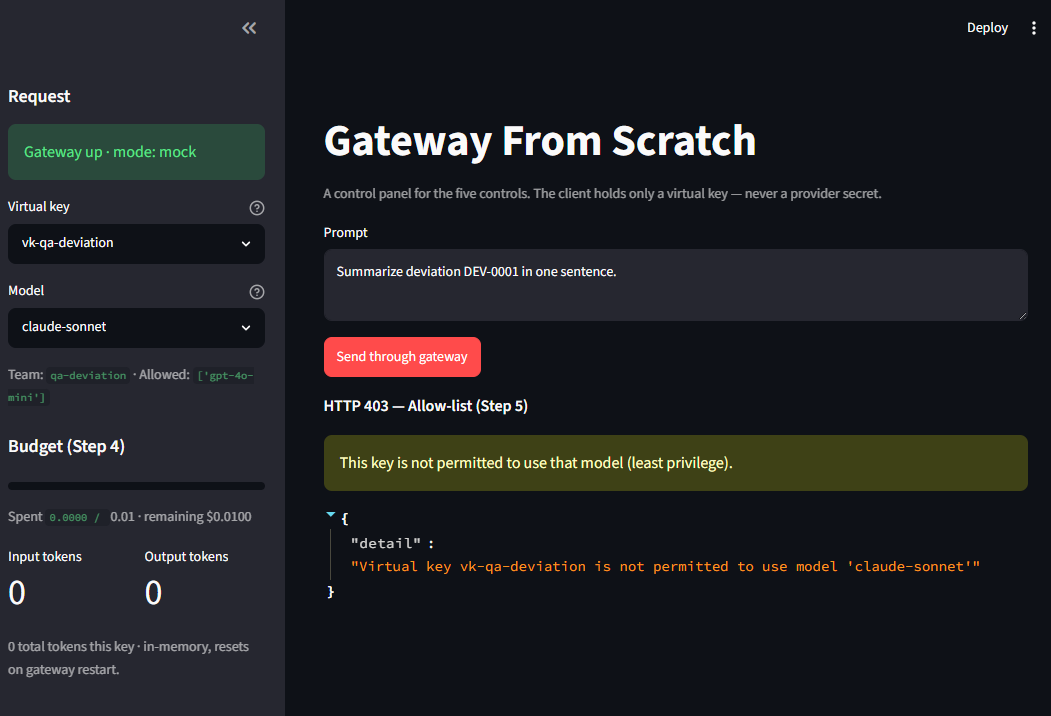
Pick vk-qa-deviation, reach for claude-sonnet, and the allow-list answers with a labelled HTTP
403 — Allow-list (Step 5) and a plain-English reason:
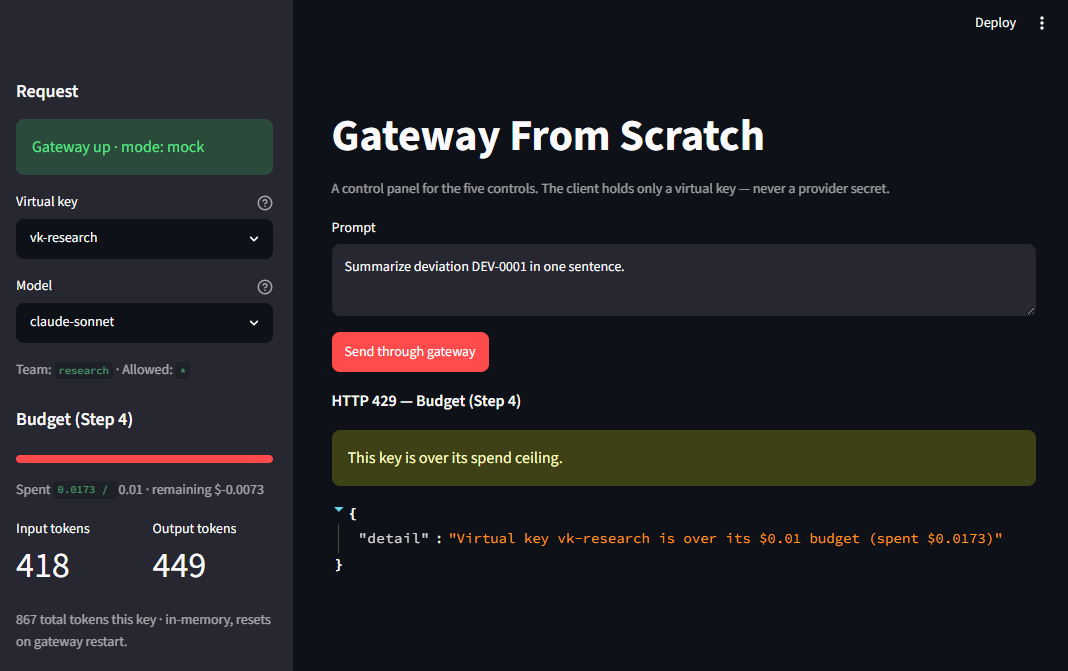
Switch back to an allowed model and send repeatedly, and the live per-key budget bar fills until the
call flips to HTTP 429 — Budget (Step 4) — while every accepted 200 renders its attributable
_gateway audit record on screen:
The app holds only a virtual key — never a provider secret — so the demo is the security story, not
a shortcut around it. Flip GATEWAY_MODE=real and set a provider key to forward to a real model; one
test per control keeps it honest (pytest -q).
What this is — and isn’t
- It is: the minimal teaching version — what a gateway is and why each control exists.
- It isn’t: production. No TLS, no real DB, no scale, no retries/failover, no streaming.
Where this is heading
Five controls in ~150 lines is the teaching version. The gap to a hardened, validated deployment is operational — persistence, horizontal scale, SSO/SCIM, real secrets infrastructure, retries and failover — plus the Part 11 / ALCOA+ audit mapping no vendor ships out of the box. Step 3’s structured log is where that mapping starts; the next artifact in the Zero to Validated sequence turns it into a hash-chained record a CSV reviewer can actually sign off on.
The enterprise equivalent
Once you’ve built this, the commercial gateway category stops looking like magic — you can see exactly
what each product is selling, because you implemented the same five controls by hand. The closest
match is LiteLLM, the de facto open-source gateway: gateway-from-scratch is essentially LiteLLM
reduced to ~150 lines. The controls map almost one-to-one:
| This artifact | The productized version |
|---|---|
| Server-side vault + virtual keys | Virtual keys + secret-manager integration |
Model registry in config.yaml | Router / model_list config |
| Structured request log | Request logging + observability callbacks |
Per-key budget (429) | Per-key budgets + spend tracking |
Model allow-list (403) | Per-key RBAC / allowed-models |
The rest of the landscape is the same idea with different packaging:
- LiteLLM — open-source, the direct equivalent of what you just built.
- Portkey — the same controls as a managed control plane (guardrails, audit logs, dashboards).
- Azure API Management / Foundry AI Gateway — the Microsoft-native version (Key Vault for the vault step, Entra for auth, token quotas for budgets).
- Databricks Unity AI Gateway — platform-native, with routing and logging living in the catalog.
The gap between this toy and any of those products is not the controls — you implemented all five real ones. It’s the operational hardening around them.